Windows Update Certificate Rotation 2027: Readiness Script

Patching isn’t the hard part of the Windows Update certificate rotation 2027. Finding the machines that never got the patch is. Microsoft’s Windows IT Pro Blog flagged the problem on October 8, 2026. Certificates expire on May 17, 2027, and June 19, 2027. Devices without the replacements lose Windows Update access.
Think of it as a Microsoft update endpoint block with a fixed date attached. The fix is a known update, so this guide skips the news recap. Instead, it gives you a PowerShell script that audits each machine against the baseline for its OS.
- Supported devices that stay current keep receiving updates without interruption.
- Windows 11 25H2 and later need nothing; 24H2 and Server 2025 need the September 2025 update.
- Other supported systems need the July 2026 update by June 19, 2027.
- Windows 10 LTSC 2019 and Servers 2016 and 2019 have the earlier May 17, 2027 cutoff.
- Unsupported systems can't be saved by patching, and the script can't see WSUS-managed devices.
The Windows Update Certificate Rotation 2027 Deadline
Two dates matter, and they hit different machines. Microsoft’s message center item MC1491763 says the certificates expire on May 17, 2027, and June 19, 2027. After that, a device that lacks the replacement certificates can’t keep connecting to Windows Update.
Supported devices that stay current won’t notice anything, according to Microsoft. The exposure sits with machines that fell behind or run unsupported versions. BleepingComputer reported that Microsoft told admins to identify every older or unsupported device before the rotation.
Sysadmin threads put the problem bluntly. Applying the update is routine, but locating isolated or out-of-date machines that miss the baseline in a large fleet is the real work. That gap is what the script targets.
Older servers face a sharper squeeze. Microsoft ends free updates for Windows Server 2016 on January 12, 2027, which is four months before its May 17 cutoff. So the baseline update has to land while patches still flow.
OS Version Matrix: Which Baselines Are Required?
Microsoft sorts the requirement into groups by OS version, and the groups don’t share one baseline. The table below condenses the guidance, so match each machine to a row before you check any dates.
| Windows 11 25H2 and later | No action required |
|---|---|
| Windows 11 24H2, Windows Server 2025 | September 2025 security update or later, before June 19, 2027 |
| Other supported Windows 11, Windows Server 2022, supported Windows 10 | July 2026 security update or later, before June 19, 2027 |
| Windows 10 Enterprise 2019 LTSC, Windows Server 2019, Windows Server 2016 | July 2026 security update or later, before May 17, 2027 |
| Unsupported versions | Upgrade to a supported release |
There’s a pattern here. The newer the release, the older its required update. Windows 11 25H2 needs nothing, 24H2 needs September 2025, and other in-support versions need July 2026, ten months later.
Build numbers help sort the first two groups. Microsoft Learn lists Windows 11 25H2 as build 26200 and 24H2 as build 26100. However, no Microsoft page reviewed for this guide confirms the Server 2025 build number, so check one Server 2025 host before trusting the result there.
PowerShell Readiness Check Script
The script answers a single question for each machine, namely whether it carries the baseline for its OS. It’s a PowerShell hotfix timestamp query wrapped in an OS gate, so it needs no extra modules. The complete listing accompanies this article.
What the Script Checks
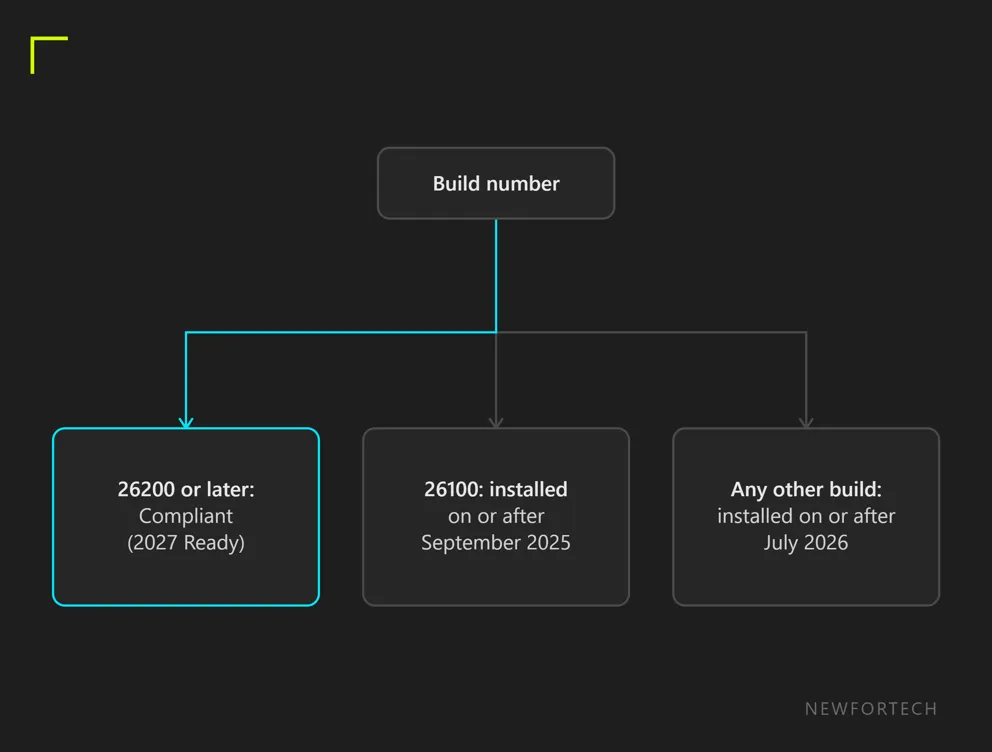
First, Get-CimInstance Win32_OperatingSystem returns the build number. Build 26200 or later passes automatically. Build 26100 needs an update installed on or after September 2025. Every other build needs one on or after July 2026.
Next, Get-HotFix supplies the InstalledOn dates. The script compares the newest date with the cutoff for that group. Then it prints Compliant (2027 Ready) or an Action Required line that names the missing update month.
Reading the Results
Each run returns one object per machine. It lists the computer name, OS caption, build, the baseline required, the newest hotfix ID and its install date, and a status. The status is the column that matters.
Three outcomes are possible. A compliant status means the newest hotfix is dated on or after the cutoff for that group. An Action Required status names the update month to install, either September 2025 or July 2026. A third status, Check manually, appears when the hotfix query itself fails, so that machine stays unaudited until someone looks.
Running It Across a Fleet
Start with one machine per OS group and compare the output with the matrix. Then push it through whatever remote execution tool you already use. Because the output is an object, Export-Csv turns a fleet run into a sortable report.
Sort that report by the required baseline first. Machines in the May 17 group go to the top, because they have the least time. The OS and build columns make that split quick.
Limits to Know Before Trusting It
Treat a pass as a screen, not proof. InstalledOn records when an update went in, not when Microsoft released it. So a June 2026 update installed in July would still pass the July cutoff. The two cutoff parameters can be tightened for a stricter test.
Also, NewForTech hasn’t run the script across a production fleet. Pilot it on a few machines in each group before you act on a fleet-wide result.
Windows 10 LTSC 2019 Compliance and Unsupported Machines
The May 17 group is where audits get uncomfortable. Windows 10 Enterprise 2019 LTSC, Windows Server 2019 and Windows Server 2016 all need the July 2026 update. Their cutoff arrives about a month before the other groups.
Falling behind on a supported version has a clear cost, according to Microsoft. Those devices can’t reach Windows Update services after the expiry dates. Still, this one is fixable, because the missing update exists today. Server 2016 hosts have the least slack, given the January 12, 2027 end of free updates.
Triage by deadline, not by hostname. Group the failing machines into the May 17 set and the June 19 set. Within each set, put anything business-critical first, because an update that needs a reboot or a maintenance window takes calendar time. Months sound generous until change-control queues enter the picture.
Unsupported versions are a different problem. Microsoft’s guidance is to upgrade them to a supported release, and no update month rescues them. The script can’t separate unsupported builds from supported ones, so it labels them like any other old machine. Cross-check those results against your OS inventory.
Windows 10 machines on Extended Security Updates aren’t off the hook either. Techzine notes that the certificate replacement is separate from the support cycle. As a result, ESU devices need the right certificates too.
Why WSUS Environments Are Exempt
Microsoft’s message center item says the change doesn’t apply to devices that receive updates from Windows Server Update Services.
The announcement doesn’t explain why, and none of the sources reviewed does either, so any theory would be a guess. What matters is scope. Microsoft’s notice doesn’t reach those machines, so a failing result on one deserves a look at its update source before anyone panics.
The script has no WSUS check, because none of the sources describe a detection method. Mixed fleets need a manual split instead. List the WSUS-managed hosts from your own tooling, set them aside, and audit the rest.
Frequently Asked Questions
01 Do Windows 11 25H2 devices need action?
02 What if my fleet uses WSUS?
03 Do Windows 10 devices on ESU still need the update?
What to Do Before May 17
Start with inventory, because the script only helps on machines you know about. Run it on a pilot group, sort the output by OS and build, then work the May 17 group first. Windows Server 2016 hosts belong at the top of that list. After patching, run the script again on the same group and keep the CSV as evidence of the before and after state.
This approach won’t suit everyone. WSUS-managed fleets sit outside Microsoft’s notice, and unsupported machines need an upgrade plan rather than a patch. For those, the script only helps you count the problem.
Keep an eye on message center item MC1491763 for revisions. This guide rests on an analysis of 6 sources, mostly Microsoft’s own, with no hands-on fleet testing.