Microsoft Rewards Points: How to Earn 10,000 in 2026

Ten thousand Microsoft Rewards points used to be a modest monthly goal; Pure Xbox says 20,000 was realistic until 2024. In 2026 it takes planning. Microsoft rebuilt the program around Member, Silver and Gold tiers, capped Bing-search points per day, and moved much of the value into monthly bonuses you have to claim yourself.
This guide adds up the ceilings Microsoft publishes, checks them against independent reporting, and builds a plan around what survives. Figures were checked on 4 October 2026 and vary by country, so confirm them on your own dashboard before you budget.
- Ten thousand points in one month is possible only by stacking bonuses, referrals and Xbox activity.
- Search alone tops out at 3,000 points a month on Gold.
- Monthly bonuses expire after about 30 days if you forget to claim them.
- Ten thousand points is worth roughly $9 to $10 in gift cards.
- Bots and rapid-fire searching risk suspension and wiped points, so skip them.
Check the Math: What It Takes to Earn 10,000 Microsoft Rewards Points
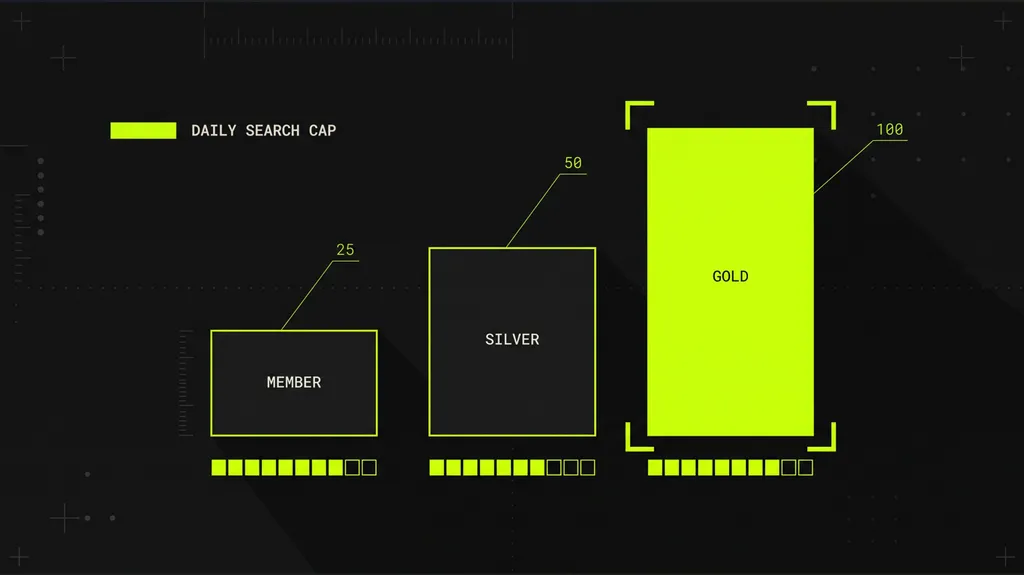
Microsoft’s Rewards overview lists a daily search allowance of 25 points for Member, 50 for Silver and 100 for Gold, at 5 points per search. The pool is shared, so PC and mobile searches draw from the same cap, and the separate phone allowance that older guides count on is gone. A Gold account that hits the cap every day for 30 days collects 3,000 points from search and nothing more.
Everything else comes from bonuses. Gold’s monthly level bonus is 700 points, the default-search bonus is 350, and the Bing Star bonus runs up to 3,500, per RottenWiFi’s summary of Microsoft’s tier table. Stack all four and the published ceiling lands at 7,550 points a month. Bing Star is the soft number in that sum. Microsoft ties it to engagement and a behavioral score, so nobody should budget the full amount.
Sources disagree because the rollout was staged. Emails to members in some countries cited daily caps of 15, 30 and 60 points, and older guides still count the former Level 2 allowance of 150 a day. The 25, 50 and 100 figures are what Microsoft’s own page showed on 4 October 2026, so treat other numbers as another market or an earlier version.
For scale, reports put 500 points at about $0.45 to $0.53, so 10,000 points is worth roughly $9 to $10. A $10 Xbox gift card has been reported at 10,000 points in some markets, and Windows Central covered Microsoft quietly raising Xbox gift-card costs. Your live Redeem page is the only price that counts.
Step 1: Join and Confirm Your Tier
Joining is free and needs only a Microsoft account. Sign in at rewards.bing.com and open the dashboard, because Microsoft says earning options and redeemable items vary by market. Member is the entry tier with the 25-point cap, so expect the first month to be your weakest.
If you have not joined yet, the card below links to Microsoft’s sign-up page. It is a referral link, and the note at the end of the article explains what we may receive.
Once you are in, open the level-up section of the Earn page. It lists the activities your account offers, which decides the route to Gold you take in Step 3.
Step 2: Spend the Daily Search Allowance Without Tripping Limits
Each qualifying Bing search pays 5 points until you hit your cap, so Gold needs 20 searches a day and Member needs five. Searching from the Bing box on a computer also feeds the default-search bonus. Microsoft says you must do it on at least 14 days in the month, and the payout is 50, 150 or 350 points by tier.
Microsoft’s support page asks members to avoid rapid back-to-back queries and names the shortcuts that trigger earning limits: spamming letters or numbers into Bing, clicking through articles quickly, and opening bookmarks in rapid succession. Spread the searches across the day. A limit is temporary and lifts once your search pattern looks normal.
Do not expect the cap to carry you to 10,000. At 100 points a day, search alone needs 100 days to reach that figure.
Step 3: Reach Gold With Two Level-Up Activities
Gold has two gates: 750 points earned in the month and two level-up activities. Silver needs 500 points, which a Member account clears by hitting its cap on 20 days.
The activity list varies by country. RottenWiFi’s summary of Microsoft’s FAQ includes seven consecutive days of Bing searching, seven days of Bing app check-ins, seven days of Daily Set, Bing as the default search engine for 14 days, an eligible Game Pass subscription and, in the United States, an Xbox Mastercard. Pick the two you would complete anyway. Seven days of Bing searching and seven days of app check-ins overlap with Step 2 and cost nothing extra. The table below recaps every tier value used in this guide.
| Spec | Member | Silver | Gold |
|---|---|---|---|
| Monthly requirement | None | 500 points earned | 750 points plus 2 activities |
| Daily search cap | 25 points | 50 points | 100 points |
| Searches per day | 5 | 10 | 20 |
| Search-only 30-day ceiling | 750 points | 1,500 points | 3,000 points |
| Level bonus | 100 points | 300 points | 700 points |
| Default-search bonus | 50 points | 150 points | 350 points |
| Bing Star bonus | Up to 500 points | Up to 1,500 points | Up to 3,500 points |
| Select hardware, points per dollar | 1x | 10x | 10x |
Two rows matter most. The level bonus rewards staying active every month, and the default-search bonus rewards a habit many people already have. Both are claimable points rather than search income, which is why claiming them gets its own step.
Daily Set tile values are unstable. Pure Xbox put the Set at a minimum of 15 points a day under the old system, and Windows Central reported Microsoft reversing a Daily Set cut earlier this year. Its main value now is the seven-day run that can count toward Gold.
Step 4: Claim Every Monthly Bonus Before It Expires
Bonuses are where the redesign costs people points by accident. Microsoft says monthly bonus points become available within the first five days of the month and must be claimed before they expire, usually about 30 days later. A missed claim is a lost bonus.
Set a reminder for the fifth of each month. The Gold level bonus is 700 points, equal to seven days of capped searching, and Bing Star can add up to 3,500 more. RottenWiFi also advises checking the dashboard mid-month for claim buttons and countdowns.
Treat Bing Star as a bonus rather than a plan. Microsoft ties it to engagement and a behavioral score meant to reward organic use, so your payout can land well below the maximum.
Step 5: Add Edge Referrals for the Biggest Single Jump
Referrals are the one lever that can move the total by thousands. Android Authority, Ubergizmo and PiunikaWeb report the same terms for the Edge mobile app program: 500 points per successful referral, capped at 15 referrals and 7,500 points a month. A referral counts when the friend installs Edge through your link and signs in with a Microsoft account, and the friend receives 500 points too. Five completed referrals add 2,500 points and fifteen add the full 7,500.
Availability is the catch. The offer appears as a prompt in Edge rather than a setting, and PiunikaWeb could not force it on for its own test devices, so some members will not see it yet. The dashboard also has a separate Refer and Earn page, and an independent advisor’s Microsoft Q&A reply describes a search-based version with a 250-point daily cap that lasts one year per referral.

Step 6: Use Xbox and Microsoft Store Only If You Already Spend There
Microsoft’s tier table lists up to 4 points per dollar on games and game add-ons at the Microsoft Store for every tier, and 10 points per dollar on select hardware for Silver and Gold. Silver and Gold members with an active Game Pass subscription can earn up to 40 points per dollar on qualifying content, and qualifying purchases are capped at 20,000 points a month.
Run the numbers before chasing these. At 4 points per dollar, a $60 game returns 240 points, worth roughly 20 to 25 cents. At 10 points per dollar, a $1,000 qualifying hardware purchase would clear 10,000 points by itself, which is a return of about 1 percent. By our arithmetic that is the fastest route to the target and the weakest earning method in this guide.
Gaming activity pays better if you already play. Pure Xbox lists up to 260 points a week for the console streak and 560 for the monthly eight-game pack at the Ultimate tier, though offers differ by region and some figures predate the redesign.
A Realistic Plan to Reach 10,000
The arithmetic below is ours, built from the published ceilings rather than measured results, so read each route as a best case.
Route one is the Gold stack. Search at the cap for 3,000, claim the level bonus (700) and default-search bonus (350), and collect a full Bing Star bonus (3,500) for 7,550. Five completed Edge referrals add 2,500 and put the month at 10,050 before a single Daily Set tile. It works only if Bing Star pays its maximum, and that part is not in your control.
Route two takes two months and needs no referrals. Search, level bonus and default-search bonus together are 4,050 points at Gold, or 8,100 over two months. The last 1,900 has to come from Daily Set, check-ins, a partial Bing Star payout or a few referrals. Month one will fall short because you start at Member.
Route three suits people who already play on Xbox. Add Game Pass quests, streaks and monthly packs to the Gold stack. Generación Xbox puts the combined range at 9,500 to 11,000 points a month, depending on region and subscription.
Shortcuts That Cost You the Account
Search bots and macros are the obvious shortcut, and the rulebook is clear about them. Microsoft’s support page bans programs, bots and macros, and says repeated violations can lead to suspension of the account and invalidation of all earned points. With the cap at 100 points a day, the most cheating can add is small, and the downside is the whole balance.
The same goes for any site that asks for your Microsoft login in exchange for points. The program is free to join, and no third party needs your credentials.
If points do not show up, check the dashboard for bonuses waiting to be claimed before you contact anyone. Referral points can also sit in a pending state. A June 2026 Microsoft Q&A thread describes 30 pending points with no claim option, and the advice was to file a Rewards Support request from the affected account.
Frequently Asked Questions
01Can you earn 10,000 Microsoft Rewards points in a month?
02How much are 10,000 Microsoft Rewards points worth?
03Do PC and mobile searches share one daily limit?
04Can Microsoft Rewards ban you for automated searches?
05How many points does an Edge referral earn?
06What do you need to reach Gold?
Ten thousand points is a payout of roughly $9 to $10 for a month of steady habits, which suits people who already use Bing, Edge or Xbox. If you would have to change browsers, buy hardware or recruit friends to get there, the return is thin and skipping Rewards is a reasonable call. The program also trades activity data for points, a cost TechRepublic flags alongside the free price tag, so decide whether that trade works for you.
Note: The Microsoft Rewards join link in this post is a referral link. If you sign up through it, we may receive Rewards points or another referral benefit at no cost to you.