PAN-OS CVE-2024-3400 Check Version: CLI Verification

CVE-2024-3400 is a critical PAN-OS command injection flaw in GlobalProtect. Palo Alto Networks rates it critical with CVSS-B 10.0, and CISA lists it in the Known Exploited Vulnerabilities catalog. The quickest audit is not a single version check. You need to confirm the PAN-OS branch, the installed hotfix, and whether a GlobalProtect portal or gateway is configured.
This guide gives a read-only CLI workflow. For a PAN-OS CVE-2024-3400 check version workflow, I treat the software build as only the first gate. The process then separates vulnerability exposure from signs of compromise, because a patched image can still deserve investigation after a suspected attack.
- Check the PAN-OS software and hotfix before anything else.
- GlobalProtect portal or gateway configuration determines exposure.
- Telemetry status does not make the firewall safe from CVE-2024-3400.
- Use gpsvc.log checks to investigate attempted exploitation.
- Upgrade to a fixed PAN-OS release even after mitigation.
Step 1: PAN-OS CVE-2024-3400 check version
Start with the software version because CVE-2024-3400 affects only PAN-OS 10.2, 11.0, and 11.1. PAN-OS 10.1 and older branches are listed as unaffected by this CVE. Cloud NGFW, Panorama, and Prisma Access are also listed as unaffected by Palo Alto Networks.
Run show system info | match sw-version. A result such as sw-version: 10.2.8 is not enough to call the firewall vulnerable by itself. The exact hotfix matters. Likewise, 10.2.8-h3 is fixed, while an unpatched 10.2.8 build falls into the affected range.
For context, PAN-OS documents show system info as the standard command for device information, including software versions. You can also run show system info | match app-version to record the Applications and Threats content version used for mitigation coverage.
Step 2: Match the version to the hotfix matrix
The official Palo Alto advisory is the controlling source for the CVE matrix. The important detail is that each maintenance branch has its own fixed hotfix. Therefore, do not compare only the first three version numbers.
| PAN-OS 10.2 | 10.2.0-h3, 10.2.1-h2, 10.2.2-h5, 10.2.3-h13, 10.2.4-h16, 10.2.5-h6, 10.2.6-h3, 10.2.7-h8, 10.2.8-h3, 10.2.9-h1 |
|---|---|
| PAN-OS 11.0 | 11.0.0-h3, 11.0.1-h4, 11.0.2-h4, 11.0.3-h10, 11.0.4-h1 |
| PAN-OS 11.1 | 11.1.0-h3, 11.1.1-h1, 11.1.2-h3 |
| Unaffected branches | PAN-OS 10.1, 10.0, 9.1, 9.0; Cloud NGFW, Panorama, Prisma Access |
A version below the applicable fixed hotfix is only the first half of the exposure test. The second half is the GlobalProtect configuration. Palo Alto Networks says a firewall is in scope when it runs an affected PAN-OS release and has a GlobalProtect gateway or portal configured.
Step 3: Verify GlobalProtect gateway and portal configuration
Next, check whether the firewall actually has GlobalProtect service objects. In operational mode, run show global-protect-gateway summary all and show global-protect-portal summary all. PAN-OS documents both commands for GlobalProtect status and summary information.
Entries returned by either command confirm that the corresponding GlobalProtect function is configured or active. No gateway output does not clear the firewall if a portal is configured, and the reverse is also true. Check both paths before assigning a final exposure status.
For a deeper configuration review, enter configure mode and use show global-protect global-protect-gateway and show global-protect global-protect-portal. These commands expose the configured objects and their settings. That view is useful when a summary command is ambiguous or when the firewall is managed through a template stack.
Step 4: Check telemetry without using it as a safety test
Device telemetry is worth recording for audit and troubleshooting, but it is not a reliable exposure gate for this CVE. Palo Alto Networks explicitly corrected its earlier guidance: disabling device telemetry is no longer an effective mitigation, and telemetry does not need to be enabled for attacks to reach an exposed firewall.
To document the configured telemetry settings, enter configure mode and run show deviceconfig system device-telemetry. This is useful for change records, but the result should not change your CVE decision. An affected PAN-OS release with GlobalProtect remains an exposure case even when telemetry is off.
For mitigation coverage, record the Applications and Threats content with show system info | match app-version. Palo Alto Networks initially identified Threat IDs 95187, 95189, and 95191 in Applications and Threats content version 8836-8695 and later. Those protections require Vulnerability Protection to be applied to the GlobalProtect interface.
Step 5: Look for attempted exploitation in gpsvc.log
Version checking tells you whether a firewall could be exposed. It does not tell you whether someone tried to exploit it. For that question, Palo Alto Networks provides a direct PAN-OS CLI grep check against the GlobalProtect service log.
Run grep pattern "failed to unmarshal session(.+\.\/" mp-log gpsvc.log*. The advisory says a session value that contains a filesystem path or embedded shell commands, rather than a normal GUID, can indicate attempted exploitation and warrants correlation with other indicators.
Suspicious output can look like failed to unmarshal session(path/to/file), while normal behavior can look like failed to unmarshal session(01234567-89ab-cdef-1234-567890abcdef). Treat the suspicious pattern as an investigation trigger, not standalone proof of compromise.
Unit 42 also documented deeper exploitation levels, from probing and test files to copied configuration files and interactive command execution. In the most serious cases, responders observed persistence and command-and-control activity. That is why a positive log hit should move the incident into forensic review rather than ending with a software upgrade.
Step 6: Choose the remediation path
The preferred fix is an upgrade to a fixed PAN-OS release. Palo Alto Networks says the CVE is fixed in PAN-OS 10.2.9-h1, 11.0.4-h1, and 11.1.2-h3, plus all later PAN-OS versions. The vendor also published hotfixes for other maintenance releases in those three branches.
While planning the upgrade, customers with Threat Prevention can use the vendor’s CVE protections. However, those signatures are a mitigation layer, not a substitute for upgrading. Ensure Vulnerability Protection is applied to the GlobalProtect interface, then continue with the fixed software version.
Because this vulnerability was exploited in the wild, a firewall with suspicious gpsvc.log evidence deserves a different response. Preserve relevant logs, correlate perimeter traffic, and use Palo Alto Networks’ compromise-remediation guidance. If persistent compromise is suspected, the vendor recommends an enhanced factory reset procedure through support because normal reset and upgrade steps may not restore trust in the device.
A practical CVE-2024-3400 decision tree
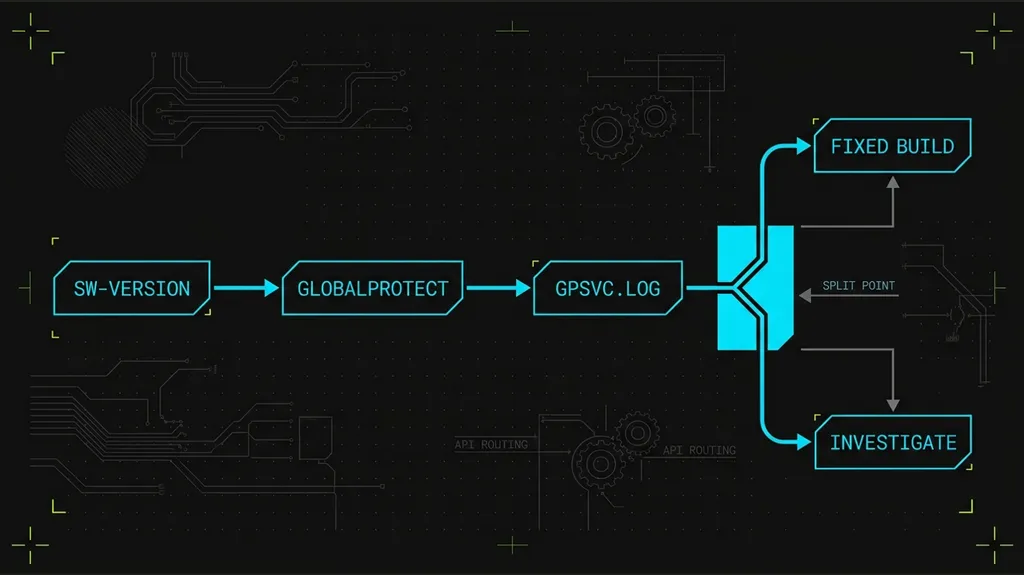
The audit branches from software version into configuration, telemetry and log review. credit: NewForTech illustrationUse this sequence for each firewall. First, read sw-version. If the branch is outside 10.2, 11.0, and 11.1, the device is not affected by this CVE. Next, if the branch is in scope, compare the exact hotfix with the matrix. Then check both GlobalProtect portal and gateway configuration.
If the PAN-OS version is fixed, record the result and still investigate any known indicators. If the version is affected and GlobalProtect is configured, treat the firewall as exposed until it reaches a fixed release. If the version is affected but GlobalProtect is not configured, keep the finding documented and confirm the configuration state before closing the ticket.
Finally, if the log check returns path-like session values or other exploitation evidence, escalate from vulnerability management to incident response. That distinction prevents a common mistake: assuming that a successful patch also proves the firewall was never compromised.
Frequently Asked Questions
01 Does CVE-2024-3400 affect every PAN-OS firewall?
02 Is device telemetry required for exposure?
03 What CLI command checks the PAN-OS version?
04 What log pattern should defenders search?
05 Is patching enough after a suspicious hit?
Verdict: when to patch and when to investigate
For CVE-2024-3400, the cleanest answer is simple: an affected PAN-OS version plus a configured GlobalProtect portal or gateway means the firewall needs remediation. Do not use telemetry as an escape hatch. Upgrade to a fixed release, keep Threat Prevention protections in place where available, and review gpsvc.log for exploitation evidence.
This workflow is not a substitute for incident response. A firewall that shows suspicious session paths, unexpected files, or command execution should not be treated as an ordinary patching ticket. Conversely, a fixed version with no GlobalProtect portal or gateway does not need emergency action for CVE-2024-3400 itself.
For the authoritative version matrix and remediation guidance, use the Palo Alto Networks CVE-2024-3400 advisory. For CLI syntax, consult the PAN-OS CLI device management guide. CISA’s Known Exploited Vulnerabilities catalog provides the broader federal remediation context.