CVE-2026-21589: Affected Versions and Fixed Versions Matrix
CVE-2026-21589 affects eight Atlassian Data Center products. The rule for affected versions is simple, because every release before the fixed version on your release line is vulnerable. Atlassian published the advisory on 5 October 2026 and rates the flaw Critical, with a CVSS 4.0 score of 9.3.
This guide covers the CVE-2026-21589 affected versions and fixed versions for each product. It also shows how to confirm what you run. Then it ranks which instances to patch first.
- Every Data Center release before the fixed version on its release line is vulnerable.
- Eight products need action: Bitbucket, Confluence, both Jira products, Bamboo, Crowd, Crucible and Fisheye.
- Attackers need no login but must know the exact name and path of a file.
- Atlassian Cloud is already patched, so only self-hosted Data Center admins must act.
- Patch internet-facing instances first, then work through internal systems.
What CVE-2026-21589 Does and Who Is Exposed
Atlassian classifies the bug as arbitrary file access. An unauthenticated attacker can read specific files inside the web application root directory. However, exploitation requires the exact file name and path, so attackers cannot list directory contents.
The CVSS vector shows why the score is so high. Attacks arrive over the network, need no privileges and need no user interaction. Even so, the real damage depends on what sits in the web root, and Atlassian warns that some configurations hold sensitive files.
Atlassian says affected Cloud products are already patched, so Cloud customers need no action. For Data Center, BleepingComputer reported that Atlassian had no evidence of exploitation at publication. Atlassian still cannot say whether any given instance was touched.
How the Arbitrary File Access Flaw Works
Atlassian has not published exploit details. Its mitigation rules still reveal the shape of the problem, because they block requests where two dots sit right next to a slash, a backslash or a double colon.
The rules also match percent-encoded and double-encoded versions of those characters. That fits a path traversal bug, and the Confluence tracker entry lists the class as Path Traversal. Atlassian confines the exposure to files inside the web application root.
Upgrade Rule: Fixed Version on Your Release Line or Later
Atlassian recommends patching to the fixed LTS version or later. Versions outside the support window may also be affected, so end-of-life installs need a supported release.
Atlassian’s bug fix policy says critical fixes now ship as new maintenance releases for covered versions. It also says binary patches are no longer released. As a result, every fix is a full version upgrade on each node.
CVE-2026-21589 Fixed Versions for Every Data Center Product
Atlassian lists one fixed version per supported release line. If your line is missing, move to a listed fixed version or later. The table below was checked against Atlassian’s advisory on 7 October 2026.
| Bitbucket Data Center | 9.4.26, 10.2.8, 10.5.1 |
|---|---|
| Confluence Data Center | 9.2.26, 10.2.19 |
| Jira Service Management Data Center | 5.12.40, 10.3.26, 11.3.12 |
| Jira Software Data Center | 9.12.40, 10.3.26, 11.3.12 |
| Bamboo Data Center | 10.2.24, 12.1.12 |
| Crowd Data Center | 6.3.7, 7.0.3, 7.1.7, 7.2.4 |
| Crucible | 4.9.15 |
| Fisheye | 4.9.15 |
The tracker entries for Bitbucket, Confluence, Jira Software and Jira Service Management list the same fix versions. For example, the Jira Software entry marks 10.3.25 as affected and 10.3.26 as fixed. Versions for Bamboo, Crowd, Crucible and Fisheye come straight from the advisory table.
You can also download the CVE-2026-21589 remediation matrix as a spreadsheet. It adds a version checker that compares your installed version with the fixed release on the same line.
How to Verify Your Installed Version
Check every node in the cluster. One unpatched node keeps the exposure alive. Also compare patch numbers only inside the same release line. A Jira 9.12.40 install is fixed, even though 9.12.40 looks older than 10.3.26.
Jira Software and Jira Service Management
Open Administration, then System, then System support, then System Info. The Jira Info section shows the installed version. Compare it with the fixed version on the same line. For example, 10.3.25 is vulnerable, while 10.3.26 is fixed.
Confluence
Sign in as an administrator and open the page at /admin/systeminfo.action under your base URL. The page shows the installed version. Atlassian’s knowledge base points admins to that page for the version.
Bitbucket, Bamboo, Crowd, Crucible and Fisheye
Read the version from each product’s admin interface, because menu labels vary by release. Then compare it with the table above. Atlassian’s mitigation steps also cover Bitbucket mirrors and mirror farm nodes, so include them in your inventory. Crucible and Fisheye share one fixed version, 4.9.15, so check both.
Which Instances to Patch First
Start with anything reachable from the internet. Atlassian says public instances should lose external access until patched or mitigated, even when they require login.
Priority tiers for exposed systems
Within that group, NewForTech would check Confluence, Jira, Bitbucket and Fisheye first, since wikis, trackers and code hosts often serve outside collaborators. Bamboo, Crowd and Crucible come next if they face the internet. Purely internal systems follow, ordered by who can reach them.
CISA KEV and patch deadlines
Check CISA’s Known Exploited Vulnerabilities catalog before setting deadlines. A listing there would turn every exposed instance into an emergency. At publication, reports showed no confirmed attacks, so the urgency comes from the 9.3 score and the unauthenticated access.
A practical order of work
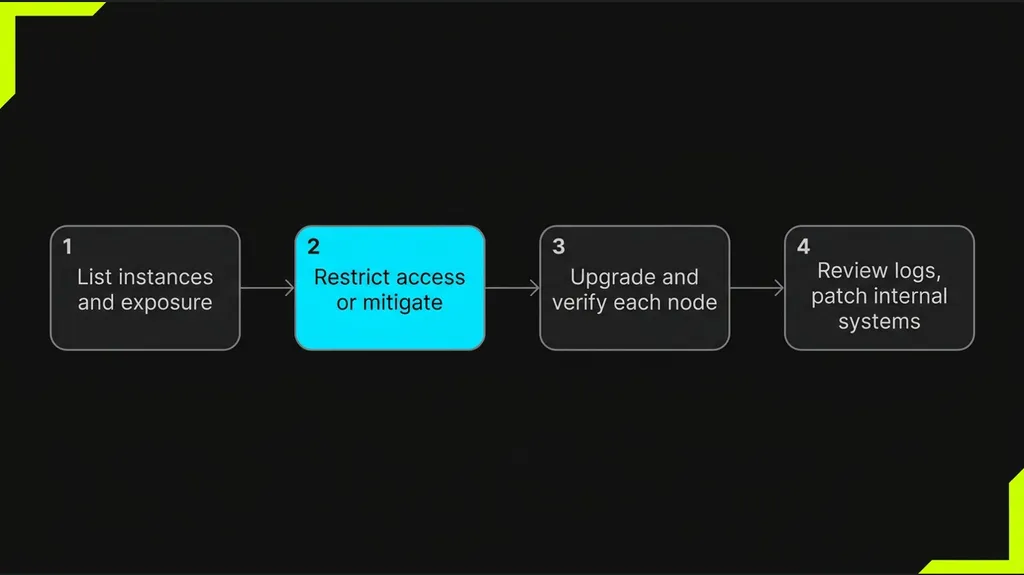
First, list every Data Center instance and note which ones face the internet. Next, restrict external access or apply a mitigation where you cannot patch today. Then upgrade the highest-exposure instances and verify each node. Finally, review access logs and work through the internal systems.
Temporary Mitigations If You Cannot Patch Today
Atlassian describes three stopgaps, and coverage differs by product. Before any of them, Atlassian asks admins to remove the instance from the internet where possible.
Option 1 is a firewall or proxy rule that blocks the traversal pattern. It works for all eight products. Atlassian publishes the exact regular expression in its advisory, so copy it from there rather than retyping it. Atlassian also asks you to test that the rule blocks the pattern and handles encoded variants.
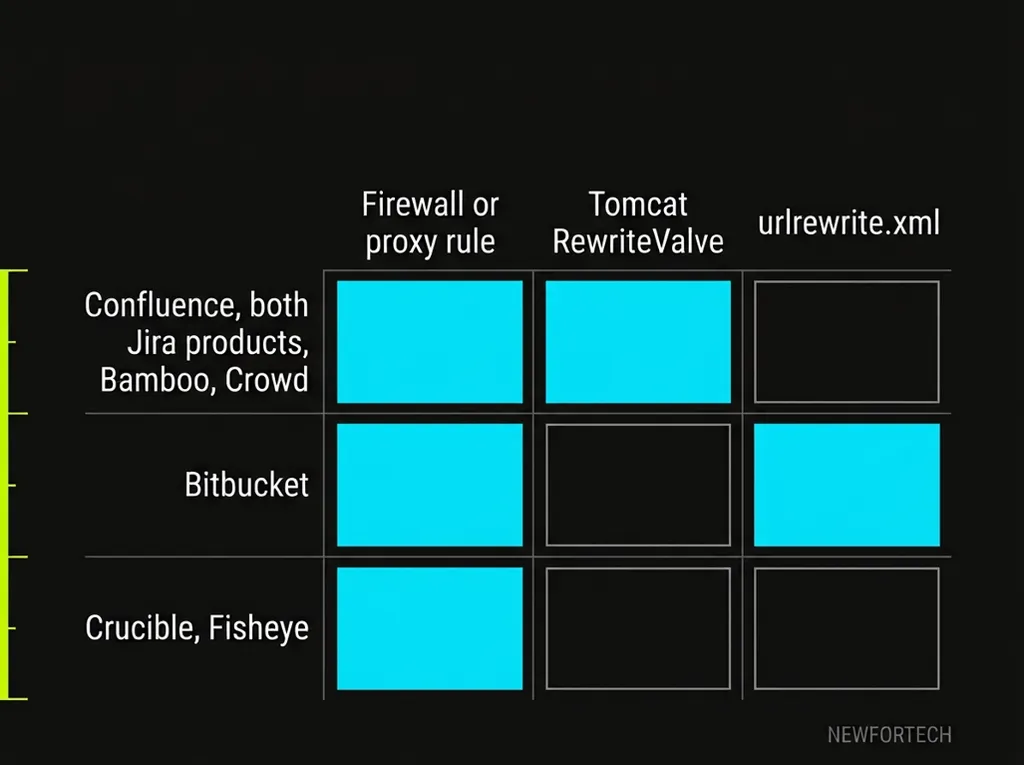
Option 2 uses Tomcat’s RewriteValve on Confluence, Jira Service Management, Jira Software, Bamboo and Crowd. On each node, you shut it down, enable the valve in server.xml, add a rewrite.config file under WEB-INF and restart. Option 3 covers Bitbucket only, with a new rule at the top of urlrewrite.xml.
Fisheye and Crucible stand out, because only the firewall rule covers them. That gives them the thinnest safety net, so patch them early.
Checking Access Logs for Exploitation Attempts
Atlassian cannot confirm whether your instances were affected, so your security team must check. The advisory suggests two methods.
First, URL-decode each access-log request line, using up to two decoding passes. Then look for two dots right next to a slash, a backslash or a double colon. Alternatively, search the raw log lines directly with the regular expression from the advisory.
A match does not prove a breach. Still, it shows which file path someone requested, and that lets you judge whether anything sensitive sat in the web root.
Frequently Asked Questions
01 Which versions does CVE-2026-21589 affect?
02 Does CVE-2026-21589 affect Atlassian Cloud?
03 Can attackers list the files on my server?
Verdict: Who Must Act Today
If you run any listed Data Center product, treat this as an emergency patch. Start with internet-facing Confluence, Jira, Bitbucket and Fisheye. Then move through Bamboo, Crowd, Crucible and internal instances by exposure. Use the fixed-version table to pick your target, and verify every node afterward.
The advisory has limits. Atlassian rates severity by its own assessment and says you should judge how it applies to your environment. The mitigations are partial, and only the firewall rule covers Fisheye and Crucible. Atlassian Cloud customers can skip this guide, because Atlassian already patched Cloud.