Apple iOS 18.4 Drops With Expanded Apple Intelligence Features — What’s New

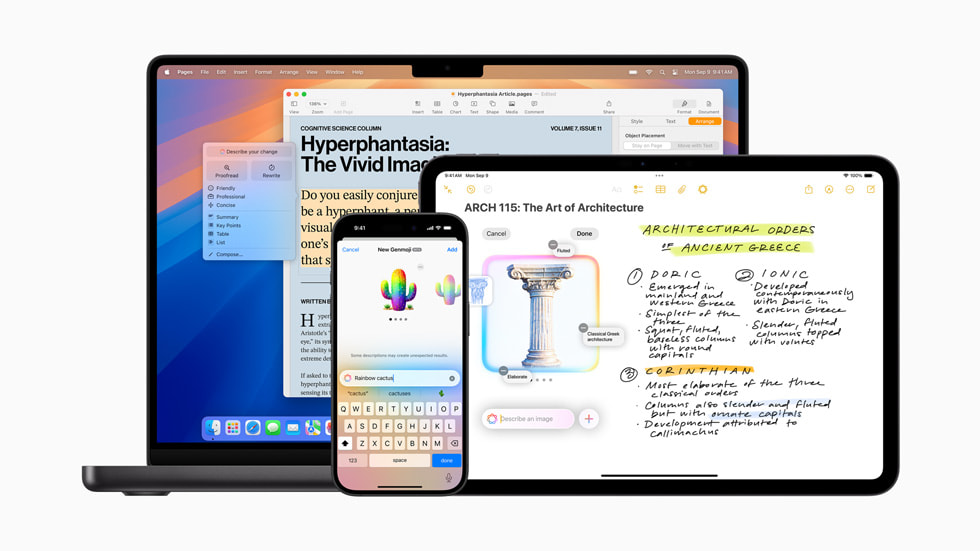
Apple iOS 18.4 landed on March 31, 2025, and it brings the most significant expansion of Apple Intelligence since the system launched with iOS 18.1 in October 2024. This update is not a minor point release — it extends Apple Intelligence to eight new languages, opens the feature to European Union users for the first time, brings it to Apple Vision Pro, and introduces several genuinely useful new capabilities including Priority Notifications, a third Image Playground style, and expanded Visual Intelligence access. Here is everything that changed and what it means for your iPhone.
Why iOS 18.4 Is a Turning Point for Apple Intelligence
When Apple Intelligence launched in October 2024 with iOS 18.1, it was available in U.S. English only, on a limited set of devices, in a limited number of regions. The system was clearly impressive in concept but deliberately narrow in its initial scope. Apple’s rollout strategy was methodical rather than explosive — introducing features in stages, gathering feedback, and resolving issues before expanding to the next tier of users and languages.
iOS 18.4 represents the point in that roadmap where Apple Intelligence transitions from a U.S.-focused early access program to a genuinely global feature. With support now covering French, German, Italian, Spanish, Japanese, Korean, Portuguese (Brazil), and Chinese (Simplified) — alongside localized English for India and Singapore — Apple Intelligence is now accessible to the vast majority of iPhone users worldwide. The EU inclusion alone represents one of the largest single expansions of availability since the feature launched.
The delay in EU availability was not accidental. Apple cited the regulatory environment under the Digital Markets Act as the reason for holding back Apple Intelligence in those markets. Whether that framing was entirely accurate or partly strategic is a matter of ongoing debate. What is clear is that EU users now have full access as of iOS 18.4, and the parity with users in other major markets is now restored.
There is also a notable device expansion in this release. Visual Intelligence, previously exclusive to iPhone 16 models with Camera Control, has been extended to iPhone 15 Pro and iPhone 15 Pro Max. These devices do not have the Camera Control button, so Visual Intelligence is instead accessible through a new Control Center shortcut that can also be assigned to the Action Button or Lock Screen controls. The feature set is identical to what iPhone 16 users have had access to since iOS 18.2.
For anyone comparing how Apple is positioning iOS 18.4 against what competing Android flagships offer in AI, the iPhone 17 Pro Review provides useful context on the trajectory of Apple’s software intelligence strategy across recent hardware generations.
Apple iOS 18.4 — Every New Apple Intelligence Feature, Explained
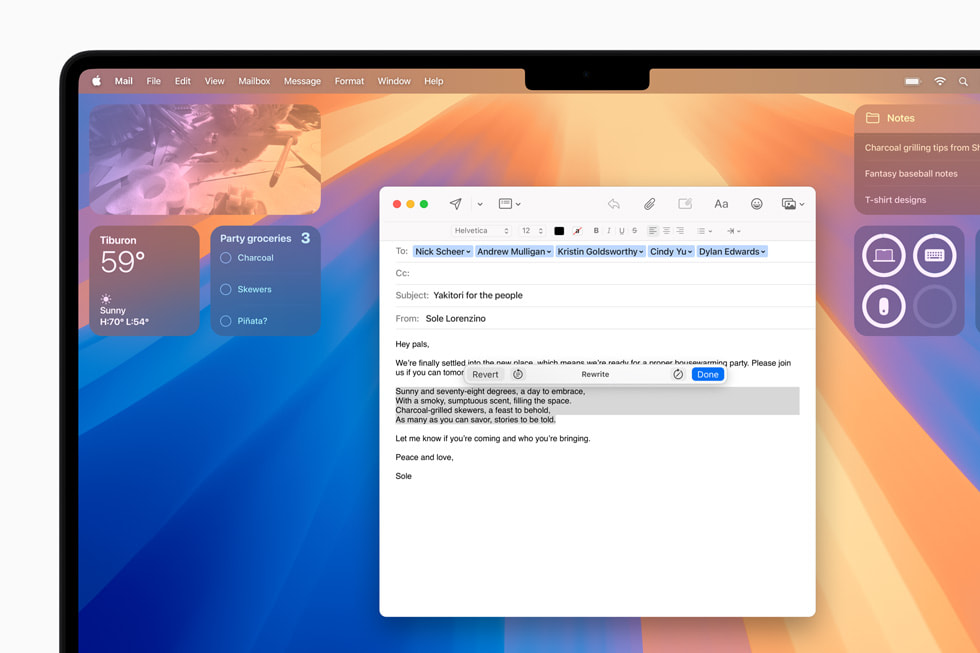
This update adds six distinct improvements to Apple Intelligence on iPhone. Each one is worth understanding individually, because their usefulness varies considerably depending on how you use your device.
- Priority Notifications: This is the most universally useful addition in iOS 18.4 for most users. Apple Intelligence now analyzes incoming notifications and surfaces time-sensitive or high-importance alerts in a dedicated section at the top of the Lock Screen, separated visually from the rest of your notifications. A food delivery update as your order approaches, a calendar reminder with ten minutes until your meeting, a boarding pass alert — these appear with priority prominence. Everything else falls below. The feature is opt-in. You enable it in Settings → Notifications → Prioritize Notifications. You can also customize it on a per-app basis, giving you precise control over what qualifies as a priority. This kind of granular control is what separates Priority Notifications from a simple algorithmic sort — the system learns, but you retain override authority.
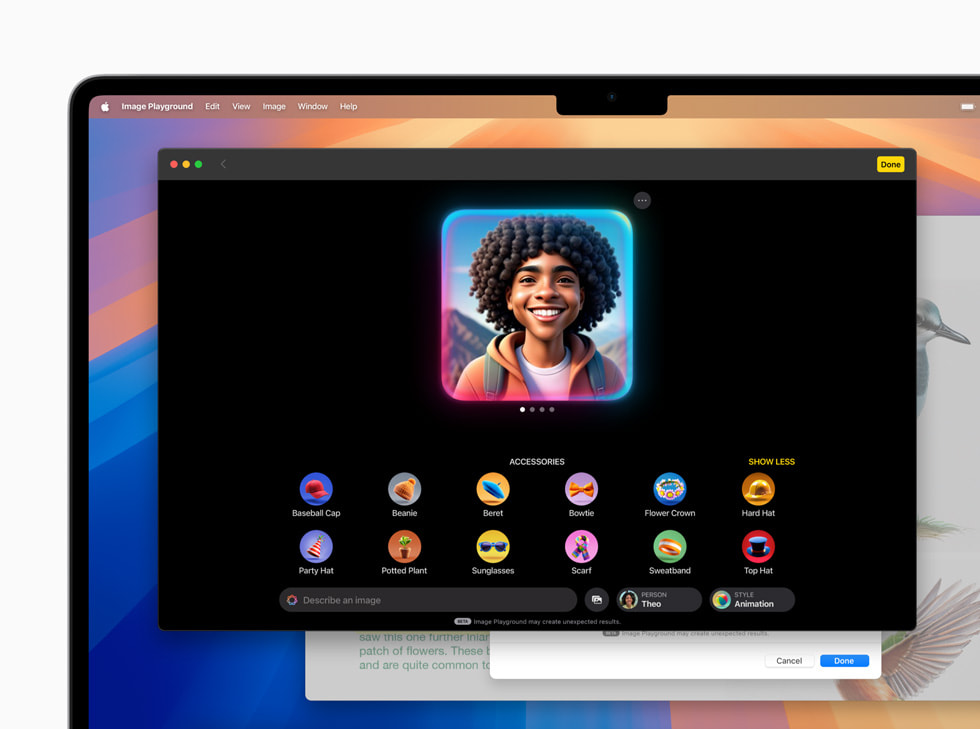
- Sketch Style in Image Playground: When Image Playground launched with iOS 18.2, it offered two styles — Animation (a 3D cartoon look) and Illustration (strong outlines, bold colors, simple shapes). Apple always announced three styles but shipped two. iOS 18.4 delivers the third: Sketch. The Sketch style produces highly detailed, academic-quality drawings on stark backgrounds, using technical lines and a structured aesthetic that looks genuinely different from the other two options. For users who create educational content, design mock-ups, or conceptual diagrams, Sketch is the most practically useful of the three Image Playground styles. Existing Image Playground creations can be converted to Sketch retroactively.
- Visual Intelligence for iPhone 15 Pro: As described above, this brings the full Visual Intelligence feature set to iPhone 15 Pro and Pro Max models via Control Center. You can point the camera at a business card, a plant, a restaurant menu, a product label, or a document — and Visual Intelligence will surface relevant information, offer to translate text, identify objects, extract contact details, or route you to Google Search or ChatGPT depending on the query type. iPhone 15 Pro users who felt left out of this capability when iOS 18.2 launched now have parity with the iPhone 16 lineup.
- App Store Review Summaries: Apple Intelligence now generates summaries of user reviews on App Store listings. Rather than reading dozens of individual reviews to get a sense of community sentiment, you see a concise AI-generated summary of what reviewers consistently appreciate and what they consistently criticize. This is practical for anyone evaluating a new app — particularly utilities and productivity tools where the review volume can be large and the signal-to-noise ratio low.
- Memory Movie Creation on Mac: Previously, the Create a Memory Movie feature in Photos required the user to dictate verbally or type on iPhone. With iOS 18.4 and macOS Sequoia 15.4, Mac users can now generate memory movies by simply typing a description. Apple Intelligence selects relevant photos and videos from the library, sequences them into a narrative arc with chapters, and produces a finished movie. The result varies in quality depending on the richness of your photo library and the specificity of your description — but for family moments, travel collections, and themed personal archives, it works better than expected.
- Apple Intelligence on Apple Vision Pro: visionOS 2.4, released simultaneously with iOS 18.4, brings the first set of Apple Intelligence features to Vision Pro. Writing Tools, Image Playground, Genmoji, Smart Reply in Messages and Mail, Mail Summaries, Priority Notifications, and natural language photo search are all available. The initial rollout is limited to U.S. English, consistent with the pattern Apple has followed on other platforms at initial launch. For Vision Pro users, this is a meaningful quality-of-life addition — Writing Tools in particular integrates naturally with the headset’s spatial text input capabilities.
What Did Not Make It Into iOS 18.4 — And Why That Matters
Understanding what iOS 18.4 does not include is as important as understanding what it does. Apple announced several Siri capabilities at WWDC 2024 that have not shipped in any iOS 18.x release. These include personal context awareness — Siri drawing on your emails, messages, and calendar to provide more tailored responses — on-screen awareness that lets Siri understand and act on what is currently displayed on your screen, and deep app integration that would allow Siri to take hundreds of new actions in third-party applications.
These features were prominently featured in Apple’s WWDC 2024 keynote and were a central part of the Apple Intelligence marketing narrative. None of them have shipped as of iOS 18.4. Multiple reports from credible outlets indicate Apple encountered significant quality issues in development and made the decision not to ship capabilities that did not meet its internal reliability bar. The anticipated Siri features are currently expected to arrive with iOS 19, which will be unveiled at WWDC 2025.
This is worth flagging because it affects how you evaluate the overall Apple Intelligence rollout. The notification management, image generation, and writing assistance features that have shipped are solid and useful. But the broader vision of a Siri that deeply understands your personal context and takes autonomous action across your apps — the version of Apple Intelligence that generated the most excitement — remains pending.
Apple was also taken to task in early 2025 over Notification Summaries occasionally producing inaccurate or misleading summaries of news content. As a result, Notification Summaries for News and Entertainment apps were temporarily disabled in earlier iOS 18.x builds. iOS 18.4 applies a visual refinement — summaries now appear in italicized text with a distinguishing glyph — to make it clearer when content has been summarized by AI rather than reproduced verbatim. The fix is presentational rather than substantive, and the accuracy debate around AI-generated news summaries remains unresolved.
Beyond Apple Intelligence: Other Notable iOS 18.4 Changes
The Apple Intelligence expansion dominates the iOS 18.4 narrative, but the update includes several other changes that are worth knowing about.
Seven new emoji ship with iOS 18.4, covering a harp, a root vegetable, a splatter, a fingerprint, a shovel, a leafless tree, and a face with bags under eyes. These additions follow the standard Unicode approval pipeline and will display consistently across platforms that have adopted the same Unicode version.
CarPlay receives meaningful improvements in this release. On vehicles with sufficiently large infotainment screens, the CarPlay Home Screen now displays three rows of app icons rather than two, significantly increasing the amount of content accessible without additional scrolling. Apple has also added a new API enabling sports apps to display live scores in the Now Playing interface — a practical addition for users who want real-time game updates during navigation. EU users also gain the ability to set a default navigation app in CarPlay for the first time, with the same choice extending to iPhone settings as well.
The Apple News app receives its most substantial update in years with the addition of Apple News+ Recipes. A dedicated Recipe Catalog lets users browse or search for dishes from participating publishers and save them to a personal recipe collection. A cooking mode provides a step-by-step display optimized for kitchen use — large text, screen-on behavior, and sequential step navigation. The Food section additionally gains editorial content covering restaurant recommendations and kitchen guidance. For Apple One and Apple News+ subscribers, this represents a meaningful addition to the service’s value proposition.
Home app users gain support for Matter-compatible robot vacuum cleaners for the first time, allowing these devices to be added to Home scenes and automations. Robot vacuums can now be triggered as part of departure routines, scheduled scenes, or any other Home automation trigger. Ten new system languages have also been added in iOS 18.4, including Bangla, Gujarati, Kannada, Malayalam, Marathi, Odia, Punjabi, Tamil, Telugu, and Urdu — a signal of Apple’s deepening investment in the South Asian market ahead of the India English Apple Intelligence expansion.
Frequently Asked Questions About iOS 18.4 and Apple Intelligence
Which iPhones support Apple Intelligence in iOS 18.4?
Apple Intelligence is available on all iPhone 16 models (iPhone 16, 16 Plus, 16 Pro, and 16 Pro Max), as well as iPhone 15 Pro and iPhone 15 Pro Max. It is not available on iPhone 15 standard, iPhone 15 Plus, or any iPhone 14 model or older. The hardware requirement is tied to the A17 Pro chip or later, as the Neural Engine in those chips is necessary to run the on-device models that power Apple Intelligence. Devices with older chips cannot access Apple Intelligence features regardless of their software version.
How do I enable Apple Intelligence on my iPhone after updating to iOS 18.4?
After updating, go to Settings → Apple Intelligence & Siri, and toggle Apple Intelligence on if it is not already active. On-device models will begin downloading after you enable the feature. Download time varies depending on your internet connection and device storage, but most models complete within 30 to 60 minutes on a fast Wi-Fi connection. Keep your device plugged in and connected to Wi-Fi to ensure the fastest possible download. Individual features can be toggled on or off within the same settings menu, giving you control over which Apple Intelligence capabilities are active on your device.
Is Apple Intelligence available in EU countries with iOS 18.4?
Yes. For the first time, iPhone and iPad users in all European Union member states can access Apple Intelligence features with iOS 18.4. The delay was attributed by Apple to regulatory considerations under the EU’s Digital Markets Act. The full feature set available in other markets is available to EU users, with the same language and device requirements applying. EU users also gain the ability to set default navigation and translation apps in this update, consistent with the DMA’s requirements around interoperability and user choice.
What languages does Apple Intelligence support after iOS 18.4?
Following the iOS 18.4 release, Apple Intelligence supports U.S. English, localized English for Australia, Canada, Ireland, New Zealand, South Africa, the U.K., India, and Singapore, as well as French (France and Canada), German, Italian, Japanese, Korean, Portuguese (Brazil), Simplified Chinese, and Spanish (Spain, Latin America, and U.S.). Both your device language and Siri language must be set to the same supported language for Apple Intelligence to activate. If you change your Siri language, Apple Intelligence may be temporarily unavailable while the new language model downloads.
Does iOS 18.4 include the new Siri personal context features Apple showed at WWDC 2024?
No. The advanced Siri capabilities — including personal context awareness, on-screen awareness, and deep third-party app integration — are not included in iOS 18.4. These features were announced at WWDC 2024 and were widely expected to arrive in earlier iOS 18.x updates, but have been delayed due to development quality issues. Current reporting from credible sources indicates these features are now targeted for iOS 19, which Apple is expected to announce at WWDC 2025.
What should I do if Apple Intelligence features are not appearing after the iOS 18.4 update?
First, confirm your device is compatible — only iPhone 15 Pro, 15 Pro Max, and iPhone 16 models support Apple Intelligence. Then verify both your device language and Siri language are set to a supported Apple Intelligence language under Settings → General → Language & Region and Settings → Apple Intelligence & Siri. If both are correct and features are still not showing, check that Apple Intelligence is enabled in Settings → Apple Intelligence & Siri, and confirm that the on-device models have finished downloading. A full device restart after the update completes can also resolve cases where features are available but not yet rendering correctly in the interface.
Conclusion: iOS 18.4 Is Apple Intelligence’s Biggest Leap Yet
Apple iOS 18.4 does not fix everything that critics of Apple Intelligence have raised — most notably, the still-absent advanced Siri features that were the centerpiece of last year’s WWDC presentation. But it delivers the broadest expansion of the system to date, and several of the features it adds are genuinely useful in daily use rather than novelty demonstrations.
Priority Notifications addresses a real problem: notification overload that buries time-sensitive alerts beneath marketing pings and social media updates. The Sketch style in Image Playground rounds out a creative tool that was intentionally shipped incomplete. Visual Intelligence for iPhone 15 Pro eliminates a gap that frustrated a significant portion of Apple Intelligence-eligible users. And the language and regional expansion transforms Apple Intelligence from a feature for a minority of global iPhone users into something approaching a universal offering.
The outstanding question remains Siri. Until the personal context and deep app integration features ship, Apple iOS 18.4 represents progress on the edges of the Apple Intelligence vision rather than its center. For users who have been waiting to see whether Apple Intelligence is worth enabling, this update provides the most compelling reason yet to turn it on — and the most realistic picture of what it can and cannot do right now.
To update your iPhone to iOS 18.4, go to Settings → General → Software Update. The update is available to all compatible devices at no charge.