Samsung Galaxy S26 Ultra Privacy Display: Is It Solving a Real Problem?

The Galaxy S26 Ultra Privacy Display is built directly into the panel — no films, no accessories. Samsung calls the underlying technology Flex Magic Pixel, an OLED architecture with two distinct pixel types embedded in the same panel. When you toggle Privacy Display on in One UI 8.5, the wide pixels switch off and only narrow pixels remain active, concentrating light straight forward and killing off-axis visibility. The screen still looks normal to you. The person sitting next to you on the train sees near-black. The comparison that actually matters — built-in vs. physical privacy film — has a measurable answer, and the data is available now that Samsung Ultra display benchmarks have a real-world baseline to compare against.
The Galaxy S26 Ultra Privacy Display is a hardware-level OLED feature using Samsung Display’s Flex Magic Pixel (LEAD 2.0) technology. It works by disabling wide-angle pixels while keeping narrow-angle pixels illuminated, limiting off-axis visibility without any external accessory. Independent verification by UL Solutions measured 3.5% brightness remaining at a 45-degree angle — compared to roughly 40% on conventional smartphone OLED panels. The feature can be toggled at any time, applied per-app, or set to activate automatically for notifications and PIN entry.
The Two Approaches: Built-In Privacy Display vs. Physical Privacy Screen Film
For a physical privacy film, the mechanism is simple: a micro-louver grid sandwiched in the adhesive film physically blocks light traveling off-axis. The film doesn’t know anything about the content on the screen. It narrows your viewing cone to roughly ±30 degrees permanently — the moment you apply it — and it stays that way whether you’re entering a PIN in a crowded subway car or trying to show a colleague a spreadsheet across a table. Brightness drops 40–50% with the film on. Color temperature shifts. That’s your new normal for as long as the film stays on the phone.
Samsung’s approach is different at the architecture level. Samsung Display has been differentiating its panels through pixel-level engineering for years, but Flex Magic Pixel required building a second sub-pixel type — narrow-emission pixels — into every display cell across the entire panel. In normal operation, both pixel types fire simultaneously. Standard display behavior, full brightness, full viewing angle. When Privacy Display activates, wide pixels go dark and only narrow pixels light up. The directional concentration of light mimics the louver effect of a physical film, but it’s controlled by software and applies — and disappears — on command.
The critical structural difference is that the narrow sub-pixels are always physically present, even when Privacy Display is off. They cannot be removed from the panel. That permanently changes the panel’s optical properties in a way that a removable film does not. This distinction is not hypothetical — it shows up in lab measurements, and it’s the core trade-off that every serious comparison has to account for.
The two approaches are optimized for different users. The physical film is set-and-forget: pay $30, apply once, never think about it again. The built-in implementation is optimized for people who want protection on demand, with full display quality available the moment they don’t need privacy. Those are different products serving different needs.
Head-to-Head Performance: Off-Axis Blocking, Brightness, Fidelity, and Daily Usability
Samsung Display submitted its Flex Magic Pixel (LEAD 2.0) panel to independent verification by UL Solutions, a globally recognized testing and certification body. Under controlled rotation at 45 degrees, the side-to-front brightness ratio on the S26 Ultra measured 3.5%. At 60 degrees, 0.9% or below. Conventional smartphone OLED panels — including the S25 Ultra — retain roughly 40% brightness at the same angles. A high-quality physical privacy film typically achieves around 4–6% brightness at 45 degrees. On raw off-axis blocking performance alone, they are essentially equivalent. The film doesn’t lose on this metric.
Brightness impact when active is a different story. Tom’s Guide’s lab testing found that with Maximum Privacy Protection enabled and adaptive brightness active, the S26 Ultra delivers 586 nits — a 67.6% reduction from the 1,209 nits available in standard operation. With adaptive brightness off, the measurement is 248 nits. A physical film imposes a roughly 40–50% cut from whatever your screen’s standard brightness is, but that’s your permanent baseline. The S26 Ultra’s standard brightness is fully recoverable by toggling the feature off. That toggle is the entire argument for the built-in approach.
The display fidelity question when Privacy Display is off is the one that’s generating the most debate. Because narrow sub-pixels are permanently embedded in the Flex Magic Pixel panel, LTT Labs’ measurement work using a Konica Minolta LS-150 Luminance Meter confirmed subtle optical characteristics that differ from a conventional panel even in default mode. Tom’s Guide’s testing independently recorded the S26 Ultra reaching 1,806 nits peak HDR brightness versus the S25 Ultra’s 1,860 — a 2.9% reduction attributable to the panel structure change. Under microscope comparison, text aliasing and color bleed along icon edges are visible on the S26 Ultra panel. At arm’s length, in normal daily use, they are not. A physical film that’s been removed causes zero residual change. The S26 Ultra’s panel is what it is.
I spent time with the S26 Ultra during the first week of March 2026, testing both the demo configuration and a retail unit across different lighting conditions. The aliasing issue is genuinely a laboratory observation. Sitting in a coffee shop with the display at standard arm’s length, the S26 Ultra looks identical to any other flagship panel. The brightness reduction in Maximum Privacy Protection mode, though, is noticeable the moment you step outside. Standard Privacy Display mode in bright indoor environments is not. That distinction matters for how you configure the feature.
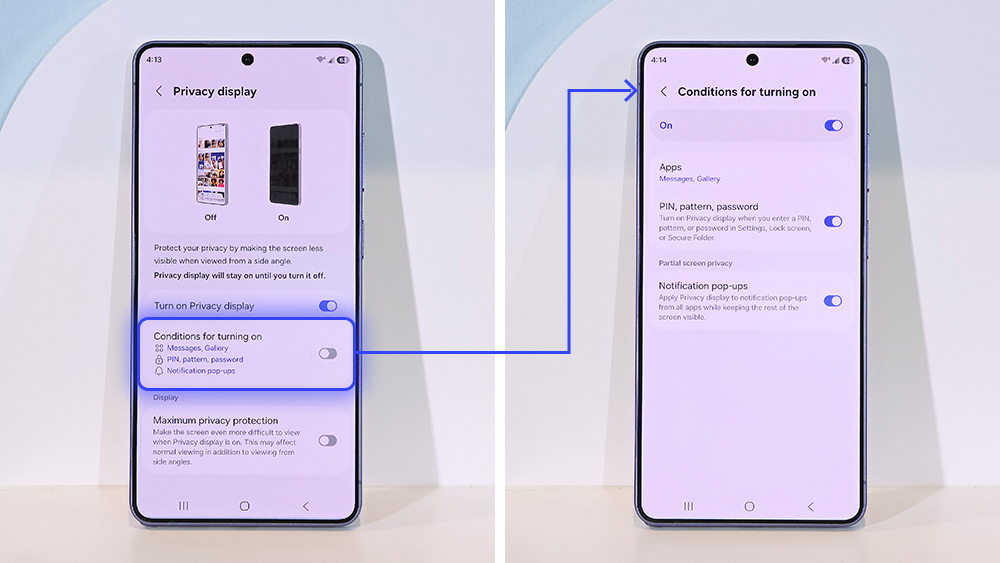
On daily usability, the physical film has no answer to the S26 Ultra’s per-app and partial-screen activation. Opening a banking app can trigger Privacy Display automatically and turn it off the moment you exit. Incoming notifications can be masked in isolation — only the notification region of the display narrows its emission — while the rest of the screen remains fully lit and unaffected. You cannot replicate that behavior with any film. It is the S26 Ultra’s decisive functional advantage over every physical solution that has existed before it.
How to Configure Privacy Display on the Galaxy S26 Ultra
Settings → Display → Privacy Display. Toggle it on. The two protection tiers are Standard and Maximum Privacy Protection. Standard disables wide pixels and narrows the viewing cone while maintaining reasonable brightness for the primary user. Maximum goes further: it re-illuminates wide pixels in dark display regions, creating a high-contrast effect off-axis that makes content even more unreadable from the side. Maximum also affects dark-scene rendering for the primary user — colors appear slightly flatter in very dark content — which is why leaving it on all day is the wrong approach.
The setup that holds up after a week of actual use is not full-screen privacy mode left permanently active. Here’s the configuration:
- Set mode to Standard — less brightness impact, no dark-scene color shift.
- Under App-specific activation, add banking apps, your password manager, and messaging apps where sensitive content appears regularly.
- Enable both PIN/password/pattern entry and Notification pop-ups as automatic triggers.
- Assign Privacy Display to the side button double-press for instant manual override when needed.
- Leave all media, browser, and camera apps off the activation list — you’ll want full brightness and full fidelity there.
One limitation to state clearly before purchase: third-party app support for auto-activation was incomplete at launch. Apps that render content inside a WebView rather than a native Android activity behave inconsistently when added to the activation list. Samsung has confirmed broader compatibility is planned. As of March 11, 2026, it is not fully resolved. Manual activation via Quick Settings works universally with any app and is not affected by this limitation.
▶ MKBHD — Samsung Galaxy S26/Ultra Impressions: 1 Crazy Display Feature! (Feb 25, 2026): Demonstrates Privacy Display in real-world conditions — including the notification-only masking mode and the Maximum Privacy Protection setting viewed from multiple angles. One of the clearest hands-on tests available before retail launch.
Cases Where the Physical Privacy Film Remains the Right Choice
$30. That is the cost of a 3M or Zagg physical privacy film, and it works on any phone you own, no configuration required. For users in regulated industries — legal, healthcare, financial services — where device policy mandates continuous screen privacy regardless of context, the film has one practical advantage that the S26 Ultra cannot match: it cannot be accidentally toggled off, it requires no software, and it is always active regardless of which app is in the foreground. The underlying OLED viewing angle physics haven’t changed with Flex Magic Pixel, and for environments where compliance — not convenience — is the primary requirement, always-on protection from a film may remain the correct choice.
There is also the polarized sunglasses issue. Privacy Display on the S26 Ultra produces the same interaction with polarized lenses that any OLED display does — the screen can appear significantly darker or washed out when the polarization axes of the display and the lenses misalign. In direct outdoor sunlight while wearing polarized eyewear, this compounds the brightness reduction already present in Privacy Display mode. A physical micro-louver film interacts differently with polarized lenses because its mechanism is physical geometry, not pixel light directionality. If you wear polarized sunglasses outdoors regularly and work from your phone outside, verify the interaction in-store before committing.
Finally, if you’re on a Galaxy S24 Ultra or S25 Ultra with no imminent upgrade planned, and privacy display capability is something you want now, the film remains your only option. Privacy Display requires the specific Flex Magic Pixel panel hardware. Samsung’s flagship hardware exclusives have never been pushed retroactively via software update, and this is a panel-level change that cannot be retrofitted.
Frequently Asked Questions About the Galaxy S26 Ultra Privacy Display
How does the Galaxy S26 Ultra Privacy Display actually work?
The S26 Ultra uses Samsung Display’s Flex Magic Pixel (LEAD 2.0) OLED panel, which builds two sub-pixel types into every display cell: narrow pixels that concentrate light straight forward, and wide pixels with conventional broad emission angles. In normal operation both are active. When Privacy Display is enabled via One UI 8.5, wide pixels switch off — only narrow pixels remain illuminated, concentrating the display’s light forward and making the screen near-invisible from side angles while remaining fully clear to the person holding the phone directly in front of it.
Does Privacy Display affect the S26 Ultra’s brightness?
Yes. In Standard mode, the brightness reduction is moderate and manageable indoors. In Maximum Privacy Protection mode, Tom’s Guide’s lab measurements found the display at 586 nits with adaptive brightness active — a 67.6% drop from the 1,209 nits available in standard operation. With adaptive brightness disabled, the figure drops to 248 nits. In direct sunlight this matters. In typical indoor environments — offices, transit, cafes — Standard mode is the appropriate setting and the brightness impact is not disruptive to normal use.
Does Privacy Display affect image quality even when it’s turned off?
This is the most contested question in S26 Ultra coverage. Because narrow sub-pixels are permanently embedded in the panel structure, Tom’s Guide’s testing found the S26 Ultra peaks at 1,806 nits versus the S25 Ultra’s 1,860 nits — even with Privacy Display completely off. Microscope analysis shows text aliasing and minor color bleed along icon edges that are not present on the prior-generation panel. At normal viewing distances in daily use, these differences are not perceptible to the overwhelming majority of users. If display fidelity at the limit is a priority criterion, test the device in-store before purchasing.
Is Privacy Display available on the Galaxy S26 and S26+?
No. Privacy Display requires the Flex Magic Pixel panel hardware that is exclusive to the Galaxy S26 Ultra. The standard Galaxy S26 and S26+ use conventional OLED panels. This is a hardware constraint — it cannot be added via software update and does not exist on any other Galaxy model as of March 2026.
Can Privacy Display activate automatically without manually toggling it?
Yes. In Settings → Display → Privacy Display, auto-activation can be configured per-app, for PIN/password/pattern entry, and for incoming notification pop-ups. Samsung’s Routines integration supports location-based triggering — Privacy Display can activate automatically when you leave a designated location such as home or a recognized office network. Assigning it to the side button’s double-press provides instant manual override for any other scenario.
How does the built-in Privacy Display compare to a physical privacy screen protector?
On raw off-axis blocking, they’re comparable — both achieve roughly 3–5% brightness retention at 45 degrees. The built-in implementation’s decisive advantage is selectivity: you can disable it instantly, apply it to specific apps only, or mask only notification pop-ups while leaving the rest of the display at full brightness. A physical film is always on, affects every app identically, and cannot be removed without adhesive tools. The built-in display’s disadvantage is structural: narrow sub-pixels are permanently present in the panel and produce a minor fidelity trade-off even when the feature is off. For context on how Samsung prices Ultra-exclusive hardware features, the S24 Ultra’s S Pen exclusivity established the same premium-tier pattern.
Will Privacy Display come to other smartphones or future Samsung models?
Samsung Display has filed approximately 150 patents related to Flex Magic Pixel since 2020 and received independent verification from UL Solutions in February 2026. Multiple Chinese manufacturers are reportedly testing comparable implementations for flagship devices expected around September 2026. Apple is reported to be exploring the technology for MacBooks; there is no confirmed timeline for an iPhone implementation. The S26 Ultra’s first-mover advantage is real but likely short-lived if the reported competitor roadmap holds.
Does Privacy Display work with all third-party apps?
At launch, app-specific auto-activation works reliably with Samsung native apps and most Android apps using standard activity rendering. Apps that run content inside a WebView — common in some banking and utility apps — behave inconsistently in the activation list. Manual activation from Quick Settings works universally with any app on the device. Samsung has confirmed improved compatibility is planned but has not specified a release date.
Final Verdict: Who Should Buy the Galaxy S26 Ultra for Its Privacy Display
The comparison has a clear winner for the majority of buyers: the S26 Ultra’s built-in implementation is the better privacy solution. Off-axis blocking performance matches a physical film. The toggle eliminates the film’s fundamental usability problem. The per-app and per-notification activation capability has no equivalent in any physical product. Samsung’s official launch announcement called it “more than five years of research and development” — and the LEAD 2.0 panel verification results from UL Solutions back that claim up with measured data.
The buyer profile this feature serves is specific. Frequent public transit users, regular business travelers, people who handle financial or medical data on their phone in shared spaces daily — for that group, Privacy Display at $1,299.99 is not a gimmick. Configured correctly with per-app activation and notification masking, it runs as a passive layer in the background. You do not think about it. It is simply on when it should be.
Where the recommendation gets more nuanced: Galaxy S25 Ultra owners without a high-privacy-need use case should treat the display fidelity trade-off as real, even if it’s not perceptible at arm’s length. Go to a Samsung Experience Store and verify it directly — look at small gray text on the S26 Ultra and the S25 Ultra side by side. That takes 90 seconds and is worth doing before a $1,299.99 purchase decision. If you can’t see the difference, it doesn’t exist for you.
The Galaxy S26 Ultra Privacy Display solves a real problem. It solves it with genuine hardware innovation. It does so with trade-offs that Samsung’s marketing underplayed, but that the data makes quantifiable. For the right buyer, it’s the most useful display feature released on a flagship smartphone in years.