NordVPN’s Desktop Redesign Makes Privacy Tools Feel Human Again

The NordVPN desktop redesign rolling out in April 2026 isn’t just a cosmetic refresh — it’s a quiet admission that most VPN apps have been needlessly annoying to use for years. If you’ve ever opened NordVPN, squinted at a wall of server names, and just clicked the first option to stop the pain, this update was built for you. Available now across Windows, macOS, and Linux, the new interface trades complexity for clarity without stripping out the power features that security-focused users actually rely on. Here’s what changed, why it matters, and what it tells us about where consumer VPN software is heading.
Contents
The Problem With Old VPN Interfaces (And Why It Took This Long to Fix)
VPN apps have had an identity crisis for a decade. They’re marketed to everyday users — travelers, remote workers, people who just want to stream a show from another region — but the interfaces have historically been designed as if the user already holds a networking degree. Long, scrollable server lists. Cryptic protocol toggles. Connection stats are buried three menus deep.
NordVPN wasn’t uniquely guilty of this, but it wasn’t innocent either. The old desktop app loaded you into a full-screen world map with a list of countries that, realistically, most users never scrolled past the first five. That friction added up. Studies on user behavior in software consistently show that even a two-second delay in reaching a core feature meaningfully increases abandonment — and for VPNs specifically, that means people connecting unprotected simply because the app felt like too much work.
The 2026 redesign addresses this head-on. And honestly? It’s overdue. The best VPN services live or die by daily usability, not just raw performance benchmarks.
What Actually Changed in the NordVPN Desktop App
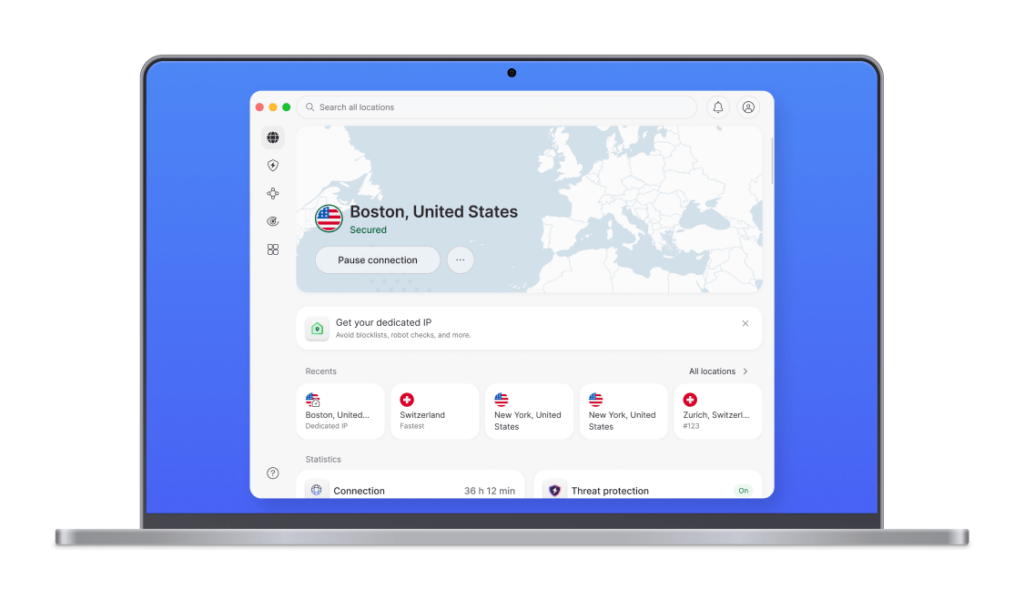
The single biggest shift is the replacement of the traditional server list with a prominent search bar that sits front and center the moment the app opens. This isn’t just a visual swap — it fundamentally changes how you interact with the app. Instead of browsing, you search. Instead of scanning, you type a country, server type, or even a Meshnet device name and get filtered results instantly.
Here’s the thing, though: unified search sounds simple, but the execution matters enormously. NordVPN’s implementation collapses three previously separate navigation paths — geographic servers, specialty servers like Double VPN or Obfuscated, and Meshnet devices — into a single query. That’s a real workflow improvement, not just a rebrand.
The home screen now also greets you with your preferred or most recent location, so routine users don’t have to interact with the search at all. A new map graphic confirms your active connection visually. For anyone who wants more detail, a three-dot menu surfaces your live IP address, server number, and session duration — all without navigating away from the main screen.
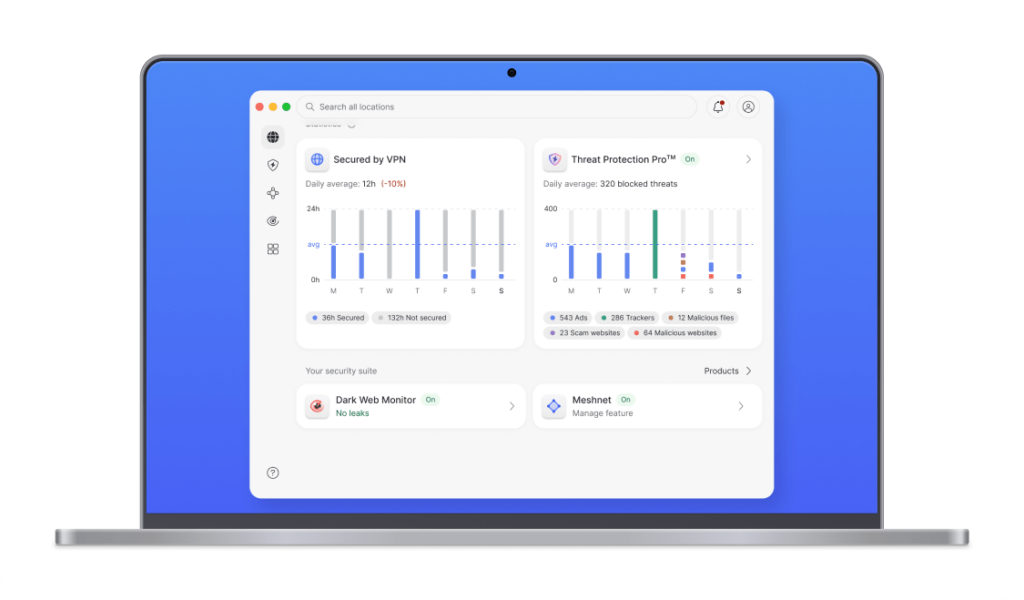
The stats section also received a genuine upgrade. Where the old app showed basic connection duration, the new version tracks daily usage averages and week-over-week comparisons. That’s a small addition with real practical value — particularly for users monitoring their privacy habits or managing VPN use across a team. If you’re already using NordVPN as your primary security layer, these visibility improvements make it easier to stay consistent.
NordVPN vs. Competitors: How the New Interface Stacks Up
| Feature | NordVPN (2026) | ExpressVPN | Proton VPN | Surfshark |
|---|---|---|---|---|
| Unified search bar | ✅ Yes | ❌ No | ⚠️ Partial | ❌ No |
| Live connection stats on home screen | ✅ Yes (toggle) | ❌ No | ✅ Yes | ⚠️ Basic only |
| Weekly usage trends | ✅ Yes | ❌ No | ❌ No | ❌ No |
| Meshnet device search | ✅ Yes | ❌ N/A | ❌ N/A | ❌ N/A |
| Preferred location on launch | ✅ Yes | ✅ Yes | ✅ Yes | ✅ Yes |
| Linux GUI support | ✅ Yes | ❌ No | ✅ Yes | ✅ Yes |
To be fair, ExpressVPN and Surfshark still have strong cases to make on raw speed and simplicity of setup. But on interface sophistication in 2026, NordVPN’s redesign puts it ahead of most of the field — particularly for users who want granular control without a cluttered UI.
What This Means for You as an Everyday VPN User
If you’re already a NordVPN subscriber, update the desktop app and spend five minutes customizing the dashboard. Enable “Show connection details” via the three-dot menu — having your live IP and server info visible at a glance is a low-effort habit that pays off quickly if you ever suspect a dropped connection. Use the category filters in search to skip the generic server list entirely and jump straight to a Double VPN or Obfuscated server when you need one.
If you’re currently shopping for a VPN, interface quality is more important than most comparison sites suggest. The fastest VPN in the world is useless if you stop using it because the app is annoying. The best VPN for Windows users right now needs to balance speed, privacy, and daily usability — and this update nudges NordVPN meaningfully in that direction.
For frequent travelers specifically, the redesign’s emphasis on one-tap preferred locations and faster connection times is a genuine quality-of-life upgrade. Connecting in an airport or hotel lobby just got a few seconds faster, and a few seconds of friction removed is a few fewer moments of temptation to skip protection entirely.
Expert Take: VPN Apps Are Finally Growing Up
What NordVPN is doing with this redesign reflects a broader maturation happening across the consumer privacy software market. For years, VPN companies competed almost exclusively on server count and speed benchmarks. The assumption was that buyers were technically literate enough to navigate complex interfaces — or that they’d figure it out eventually.
That assumption is crumbling. The VPN user base has expanded dramatically beyond the tech-savvy early adopter. Remote workers, families managing household security, small business owners — these users need software that behaves like a trusted tool, not a networking console. The companies that internalize this shift earliest will hold a significant retention advantage.
NordVPN’s sixth consecutive independent no-logs audit, completed earlier this year, reinforces that the company isn’t sacrificing security credibility for UX polish. That combination — audited privacy infrastructure paired with genuinely improved usability — is where the future of consumer VPN privacy tools is heading. Expect Proton VPN, Mullvad, and others to accelerate their own interface overhauls in response.
NordVPN’s desktop redesign won’t make headlines the way a massive speed improvement or a landmark court case would. But in practical terms, it removes the low-level friction that quietly erodes daily VPN usage — and that matters more than most people realize. The shift from list-based navigation to search-first design is exactly the kind of thoughtful, user-respecting change that keeps a product relevant as its audience evolves. Whether you’re a long-time subscriber or still comparing options, this update is worth a closer look — and a fresh install.
Frequently Asked Questions
What changed in the NordVPN desktop app update in 2026?
The April 2026 NordVPN desktop update replaced the old scrollable server list with a unified search bar, added a preferred-location home screen, introduced live connection stats as a toggleable dashboard element, and expanded the statistics section to include daily averages and weekly usage comparisons. The update is available on Windows, macOS, and Linux.
Does the NordVPN redesign affect connection speeds or security features?
The redesign is primarily a UX and interface overhaul — core VPN protocols, encryption standards, and the no-logs policy remain unchanged. NordVPN passed its sixth independent no-logs audit in 2026, so the security foundation is intact. The interface changes are designed to reduce the time it takes to connect, which can indirectly improve protection by reducing the temptation to skip using the VPN.
How do I enable connection details in the new NordVPN desktop app?
Open the updated NordVPN desktop app, click the three-dot menu on the home screen, and select “Show connection details.” This will display your current IP address, active server number, and session duration directly on the dashboard without requiring you to navigate to a separate settings screen.
Is NordVPN still one of the best VPNs for Windows in 2026?
NordVPN remains one of the top-rated VPNs for Windows, particularly after the 2026 desktop redesign improved daily usability. It combines strong encryption, an audited no-logs policy, a large server network, and now a cleaner interface that makes it competitive with simpler rivals like ExpressVPN while retaining more advanced features than most consumer VPNs offer.
Can I search for Meshnet devices in the new NordVPN app?
Yes. The redesigned search bar in the 2026 NordVPN desktop app unifies all connection types — including geographic servers, specialty servers like Double VPN or Obfuscated, and Meshnet devices — into a single interface. You can filter by category or search by name to connect to any device or server type without navigating separate menus.