CVE-2026-104286 FortiMail: Check, Patch, Verify 7.2-8.0
The CVE-2026-104286 FortiMail flaw is under active exploitation, and Fortinet scores it 9.8 on CVSS. Advisory FG-IR-26-175 says an unauthenticated attacker can write arbitrary files through crafted HTTP or HTTPS requests. The workaround stops new requests from landing. It does not show whether an attacker already used the route.
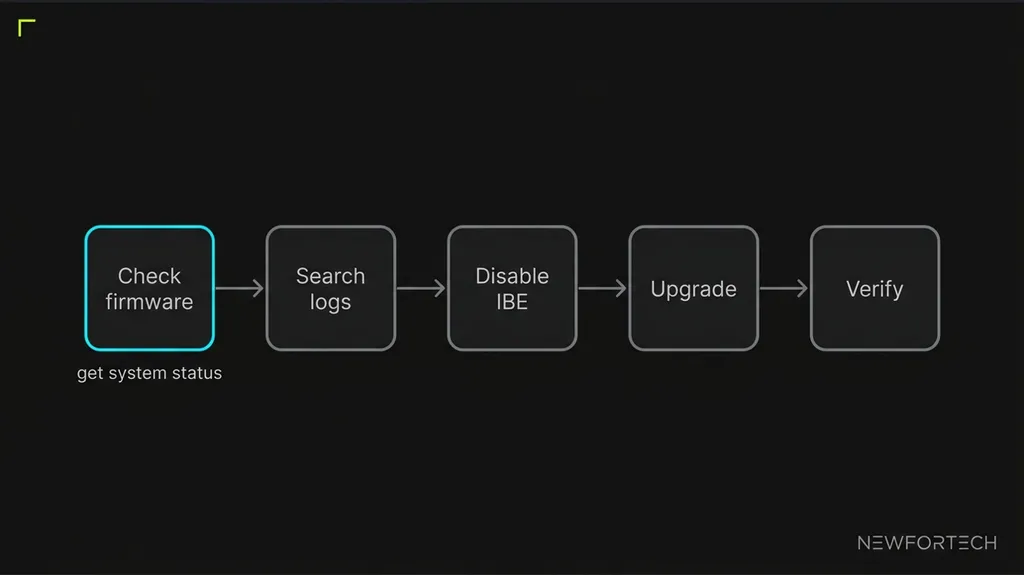
This guide follows one order of work. Check the firmware, search the logs for Fortinet’s published strings, disable IBE, then plan the upgrade by branch. Every command and string below comes from Fortinet’s advisory or its CLI reference.
- Fortinet rates CVE-2026-104286 at CVSS 9.8 and reports exploitation in the wild.
- Disabling IBE is a stopgap, not a fix.
- Search system event logs for O=/migadmin and encryption logs for Invalid Base64 Encoding.
- FortiMail 7.2 has no fix, so Fortinet says to move to 7.4 or above.
- FortiMail Cloud customers need no action, according to Fortinet's 7 October clarification.
Triage: CVE-2026-104286 Impact on FortiMail
This is a FortiMail path traversal that needs no login. Fortinet files it under CWE-22 and CWE-158, a path traversal combined with improper handling of NULL characters. The vector link in the advisory shows network access, low complexity, no privileges and no user interaction.
The advisory lists the impact as execution of unauthorized code or commands. It also marks the flaw as known exploited and lists no virtual patch. Fortinet names the GUI as the component, so web-facing interfaces are where to look first.
CISA added the flaw to its Known Exploited Vulnerabilities catalog on 1 October, the day of the advisory, according to SOCRadar. The Cloud Security Alliance notes that outlets differ on the federal due date. The catalog entry itself is the authoritative source for that deadline.
Other edge appliances follow the same pattern. The NetScaler build and config check makes the point for another exposed device: an upgrade closes the hole but says nothing about earlier access.
Rank Units by Exposure
Position raises the stakes. Wiz notes that FortiMail is an email security gateway, so compromise could expose sensitive communications and allow lateral movement into internal networks.
Four groups cover most estates. First come affected units that publish webmail or IBE pages to the internet, and those get the mitigation and the log search on the same day. Second come affected units reachable only from private networks, which can wait for a scheduled upgrade. Third are 7.2 units, which need a migration plan. Fourth is FortiMail Cloud, which needs no action.
That order follows from the advisory, whose alternative mitigations both turn on who can reach the interface. It also answers the inline-gateway question: reach decides urgency, not position in the mail path.
Step 1: Check the Running Firmware
Run get system status on each unit. Fortinet’s CLI reference says the output includes the firmware version, build number and date. Newer releases also report HA mode and role, which helps when you manage a pair.
Then compare the version line with the table in the upgrade section. For example, the reference shows a line reading FortiMail-VM v7.6.2, build753. A unit on 7.6.2 would sit inside the affected 7.6.0 through 7.6.6 range.
Boundary builds matter. A unit on 7.4.8 is the last affected build in its branch, and 7.4.9 is the first fixed one. The same reading applies to 7.6.6 against 7.6.7 and to 8.0.1 against 8.0.2. Every 7.2 build up to 7.2.9 is affected, and no 7.2 build is listed as fixed.
Log Hunting: Checking for Compromise
Fortinet published indicators tied to the attacks, so this step is a string match rather than a judgment call. Help Net Security reports that the files, IP addresses and log entries come from the observed attacks. The advisory names no console menu or CLI command for searching logs, so use whichever export or SIEM you already run.
Start with the network indicators. The advisory lists two IP addresses, 79.141.169.187 and 45.129.0.192, and writes them in defanged form. Search firewall and mail logs for both, in addition to the FortiMail logs.
Count the indicators: two IP addresses, three system event patterns and two encryption log patterns, seven in all. Load them into one saved query instead of running seven manual searches. Set the window to reach back past 1 October, because the advisory already reported exploitation on the day it was published.
Step 2: Search the System Event Logs
Fortinet lists three system-level patterns. The first is a debug-level cron line, run as root, whose shell command contains O=/migadmin. Treat any hit on that string as a reason to escalate.
The second is an admin logout message reading User admin logged out from (null). The third is a CLI configuration entry reading Added 'archive234' to 'archive account'. In the advisory’s example, that account has a remote destination at 79.141.169.187 and the remote directory /uploads.
Read the logout and configuration lines next to the cron entry. An admin logout appears in normal operation as well, so it proves little alone. An archive account that sends files to an address on the indicator list is a different matter.
Step 3: Search the Encryption Logs
Two encryption log patterns are listed. The first is an IBE decrypter exception that ends with Invalid Base64 Encoding at pos 0. Character=0x2a. The second is a failed internal login reading Internal user *@domain.tld failed to log in.
Searching on Invalid Base64 Encoding alone catches the exception without depending on the position or character values. Both searches carry one limit.
A match moves the unit from patching to incident response. The advisory lists the strings but gives no clean-up procedure. Export the matching lines before you change anything, so the evidence stays intact.
The IBE Command Mitigation: Disabling IBE
Fortinet’s zero-day workaround is to switch off IBE, the identity-based encryption feature, as Help Net Security describes it. The advisory gives two routes. One is the GUI path Encryption, then IBE, then IBE Service set to off. The other is the CLI.
If a unit faces the internet and the log search will take hours, disable IBE first. The change is three commands, and it does not depend on the search result.
Step 4: Disable IBE From the CLI
Enter config system encryption ibe, then set status disable, then end. Fortinet gives these three lines in the advisory. They are the only CLI lines the advisory publishes for this mitigation.
Disabling IBE stops any workflow that depends on it. The advisory does not describe the service impact, so check whether recipients rely on IBE before you make the change.
The advisory lists two alternatives for units where IBE must stay on. One is to remove internet access to the FortiMail webmail interface or limit it to trusted private networks. The other, where a web application firewall sits in front, is a rule that blocks POST requests to /ibe when they contain ../, as the advisory words it.
The Hacker News describes the first alternative as restricting the management interface, so the cautious reading restricts both. Neither alternative fixes the flaw. The advisory also does not say whether the firewall rule covers encoded variants.
The three stopgaps work at different layers. Disabling IBE removes the feature, restricting webmail removes the network path, and the firewall rule filters one request pattern. Only the first two act without depending on a pattern match.
Firmware Upgrade Paths and Timeline
Fixed builds exist on three branches, and the fourth has no fix of its own. The table lists Fortinet’s affected range and the target for each branch.
| FortiMail 8.0 | 8.0.0 through 8.0.1, upgrade to 8.0.2 or above |
|---|---|
| FortiMail 7.6 | 7.6.0 through 7.6.6, upgrade to 7.6.7 or above |
| FortiMail 7.4 | 7.4.0 through 7.4.8, upgrade to 7.4.9 or above |
| FortiMail 7.2 | 7.2.0 through 7.2.9, upgrade to branch 7.4 or above |
Branch 7.2 is the exception. Fortinet says to upgrade to branch 7.4 or above, so a 7.2 owner faces a migration rather than a patch window. Plan that move early, because the other three branches need only a point release.
Upgrade order follows the triage groups. Internet-facing units on 8.0, 7.6 and 7.4 go first, because each needs only a point release. Private-only units follow. Any 7.2 unit runs on the IBE mitigation while its migration is prepared.
How the Timeline Shifted After 1 October
The timeline shifted during the first week. Fortinet published the advisory on 1 October. The Hacker News described 8.0.2, 7.6.7 and 7.4.9 as upcoming at that point. The Cloud Security Alliance still listed all three as unreleased on 3 to 4 October.
Fortinet updated the solution on 5 October and clarified the cloud position on 7 October. The advisory says it moved FortiMail Cloud to v7.6.7 GA or v8.0.2 GA, so cloud customers need no action. That implies both builds exist. The advisory makes no such statement for 7.4.9, so confirm that build on the Fortinet support portal.
A multi-unit estate benefits from a per-branch matrix. The CVE-2026-21589 fixed-version matrix shows that format for eight Atlassian Data Center products.
Post-Fix Verification and Rollback
Verification has two parts: the firmware and the IBE state. Run get system status again and confirm the version is at or above the fixed build for the branch. That means 8.0.2, 7.6.7 or 7.4.9, and a unit moved from 7.2 should report 7.4 or above.
Then confirm the IBE state in the GUI. The advisory publishes no CLI read-back command, so the setting it names is Encryption, then IBE, then IBE Service. Fortinet gives no separate re-enable guidance either.
The sensible order is upgrade, verify the version, then re-enable IBE and watch the encryption logs for Invalid Base64 Encoding. The advisory frames the disablement as a workaround, which supports re-enabling only on a fixed build.
Rollback has limits. The advisory publishes no firmware downgrade procedure, so read the release notes for the target build before you upgrade. Undoing the workaround means switching IBE Service back on in the GUI, and nothing in the advisory supports doing that on a vulnerable build.
A short acceptance test closes the work. A unit passes when four conditions hold. The version is at or above the fixed build, the IBE state matches the plan, the seven indicators return no hits, and neither IP address appears in firewall logs.
Keep the log strings as a saved search after the upgrade. A fixed build closes the route, but it cannot show access that happened before the upgrade.
Frequently Asked Questions
01 Is FortiMail Cloud affected by CVE-2026-104286?
02 Does disabling IBE fix CVE-2026-104286?
03 Which fixed build covers FortiMail 7.2?
04 Can a web application firewall block the attack?
Where This Checklist Stops
This checklist covers detection and mitigation, not clean-up. Fortinet’s advisory publishes no remediation steps for a compromised unit, so a log match needs an incident response decision. It also names no log search command, no IBE read-back command and no service impact for disabling IBE.
FortiMail Cloud customers can skip it, because Fortinet says it patched that service. This guide is an analysis of 7 sources, mainly the FortiGuard advisory and Fortinet’s CLI reference. It involved no hands-on testing, and the CISA catalog entry itself was not loaded.